Detailed Review & Comparison of the Top Grammarly Alternatives with Features & Pricing. Select the Best Alternative to Grammarly for Flawless Content:
Grammarly is one of the most popular and widely used software tools for grammar checking, spell checking, and plagiarism checking.
With Grammarly, your writing becomes flawless and simplified by avoiding small mistakes like including a hyphen, comma, capital letter, etc. Additionally, it includes an AI-powered writing assistant that helps you to write clearly without any mistakes and make use of concise words at the right time.

Not limited to that, it lets you work on any platform without any interruption and corrects you every time you write emails, post tweets, etc. Grammarly’s Chrome extension is just amazing and lightweight to help you out with all your writing needs.
Table of Contents:
Grammarly – An Overview
The best part of Grammarly is that you don’t have to download any physical software on your device as its extension is powerful enough to fulfill all your basic to advanced requirements. It also provides a free version for its users to get the benefits of somewhat professional writing.
Dashboard
It has a very nice, clean, and intuitive dashboard that shows all the recent documents you worked on, your profile, and the apps you have integrated with. The dashboard also lets you perform proofreading that automatically detects grammatical errors, spelling mistakes, and style mistakes in your writing.

Recommended reading =>> Top 10 Sentence Checker Online Applications
What else is it good for?
Read through these points to learn some lesser-known facts about the tool:
- According to Forbes, Grammarly makes your writing better, quick, and easy.
- Works anywhere and corrects you on every platform where ever you write.
- Proofreading also checks plagiarism in your content & generates citations.
- Its proofreading tool scans your content for more than 400 grammar rules.
- From grammar & spelling to style & tone, it helps you to express yourself more cohesively.
Do these facts provide enough reasons why you need a tool like Grammarly?
Well, not just you, all of us need such a tool because not only does it correct mistakes and grammar but also gives our writing a professional and cohesive tone.
Features
Enlisted below are the various features of Grammarly:
- It is compatible with all types of devices like Windows, Mac, Android, and iOS.
- Comes with a neat and clean dashboard with functionalities including proofreading and plagiarism checker.
- Uses AI (Artificial Intelligence) to correct mistakes and find grammatical errors in a block of text.
- Allows users to perform their writing using all popular web browsers like Chrome, Safari, Firefox, etc. with their extensions.
- Includes features like multiple device document access, performance stats, vocabulary enhancement suggestions, and a personal dictionary.
Grammarly Stats

According to Similar Web, Grammarly has total monthly visits of 55.50 Million with an average visit duration of 2:05 min and a bounce rate of 51.18%.
Per Medium.com, Grammarly quietly grew its way to 6.9 Million daily users and its free Chrome extension has been downloaded 10 Million times.

Additionally, huge traffic is coming from the direct search which is around 52% and this means that people are loving the tool.
Pricing
Services provided by Grammarly include:
- Grammarly EDU
- Grammarly Business
- Handbook
- Grammar Checker
- Plagiarism Checker
Its actual pricing is not revealed on the website and you need to request a quote from the sales team. However, according to different review sites, the monthly price of its Premium plan is $29.95.
Why Do We Need Grammarly Alternatives?
- Its free version is very limited and has only one thing to do with your writing i.e. to correct spelling and grammar in your writing.
- For those who completely rely on Grammarly for their writing, please note it might not work with all the apps that you work on.
- Their advertising strategy is very aggressive and ultimately, they just want you to upgrade to Premium plans even if your requirements are less.
- When we compare it to a human proofreader it cannot be considered a complete replacement for a proofreader.
- Some people may hesitate to pay $29 per month just to check grammar in their writing.
- Many times the software misbehaves and shows red underlines even if there are no mistakes.
List of Top Grammarly Alternatives
We have come up with a list of the top alternatives for Grammarly along with the reasons to select them. Each tool has been described in detail with its benefits and USPs.
- ProWritingAid
- Sapling
- Originality.ai
- WordAi
- WhiteSmoke
- Ginger
- PaperRater
- Reverso
- SentenceCheckup
- Hemingway App
- LanguageTool
- Slick Write
- Scalenut
- Wordtune
- Linguix
- Course Hero
Comparison Of Grammarly And Its Competitors
| Tool Name | Suitable For | Free Plan/Trial | Browser Extension | Devices | Deployment | Pricing Model | Our Rating |
|---|---|---|---|---|---|---|---|
| Grammarly | Multi-tasker & beginner | Free Plan | Available for Chrome, Safari, and Firefox. | Windows, Android, Mac, iOS, Web-based. | Cloud-hosted | Monthly & annually (starting at $29) | 5/5 |
| Tools | Suitable For | Free Plan/Trial | Browser Extension | Devices | Deployment | Pricing Model | Our Rating |
|---|---|---|---|---|---|---|---|
| ProWritingAid | For every writer | Free Plan | Available for Chrome, Safari, and Firefox | Windows, Mac and web-based. | Cloud-hosted, on-premise & open API. | Annually & quote based (starting at $5). | 5/5 |
| Sapling | Business Teams | Free Plan | Available for Chrome, Edge and Firefox | Windows, Mac and Web-based. | Cloud-hosted & on-premise | Monthly (starting at $25) | 4.9/5 |
| Originality.ai | Professional writer and editor | Free chrome extension | Chrome | Web-based | Cloud-hosted | Starts at $14.95/month | 4.5/5 |
| WordAi | Writers, Students, Authors | 3 day free trial | — | Windows, Mac. | Cloud-hosted | Starter: $9/month, Power: $27/month, Custom enterprise plan | 4.5/5 |
| WhiteSmoke | For time saver | No Free Plan/Trial | Available for Chrome | Windows, Android, Mac, iOS, Web-based | Cloud-hosted & on-premise | Monthly, annually & quote based (starting at $4.16) | 4.7/5 |
| Ginger | Multi-tasker | Free Plan | Available for Chrome, Safari, and Firefox | Windows, Android, Mac, iOS, Web-based | Cloud-hosted & on-premise | Monthly & annually (starting at $20.97) | 4.2/5 |
| Linguix | Professional writers, authors, beginners, students | Free plan available | Available for Chrome, Firefox and Edge | Web, Mac, Android, iPhone, Windows | Cloud-hosted, ON-PREMISE, Mobile | Monthly, annual, and lifetime | 4.5/5 |
| Course Hero | Students and Writers | Free to use | Chrome | Web-based, iOS, and Android | Web-based, Mobile, Chrome | Its subscription starts at $9.95/month (billed annually). | 4.5/5 |
Let’s Explore!!
#1) ProWritingAid – Recommended
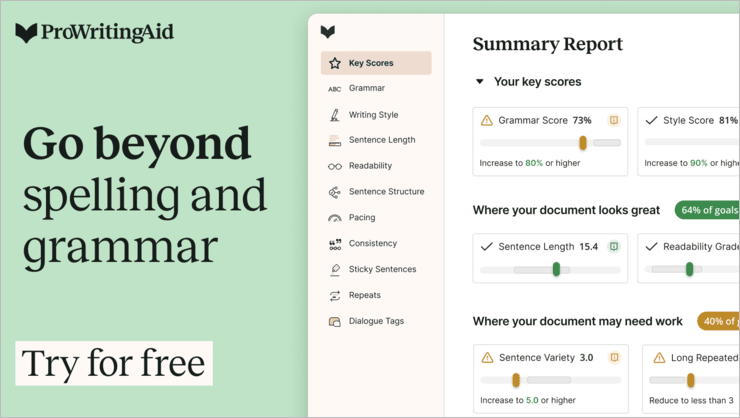
ProWritingAid is an editing, Plagiarism checker, Grammar checker, and Style editor tool for improving your writing and English skills. The software acts as your mentor or personal writing coach so that whenever you present yourself you feel confident.
The best part is that it also works in Google Docs and all the other platforms. ProWritingAid software is mostly used by Fiction & Non-fiction Authors, Bloggers & Content writers, Students, Business writers, etc.
Features:
- In-depth reports that include more than 20 different types of reports for analyzing your writing.
- Better integration with Microsoft Suite, Google Chrome & Docs, Apache Open Office, Scrivener, etc.
- Contextual Thesaurus report for suggesting synonyms for each word in your text by allowing you to quickly explore different wordings.
- Word Explorer for finding the right words from different dictionaries and detailed explanations for saving your time.
- Manuscript editing software for grammar checking helps in finding repeated words, context-sensitive style suggestions, and visualizing sentence lengths and variations.
Pricing:
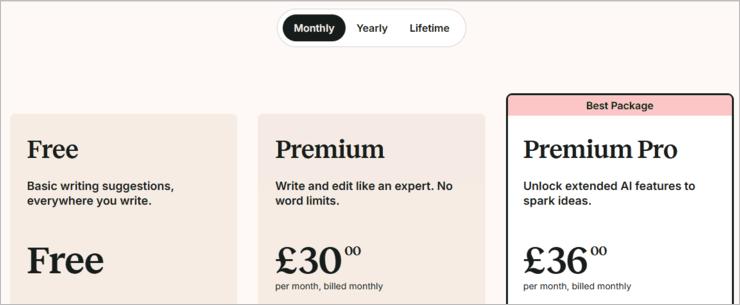
ProWritingAid offers a Free plan along with two different paid plans:
Monthly price:
- $30 Premium
- $36 Premium Pro
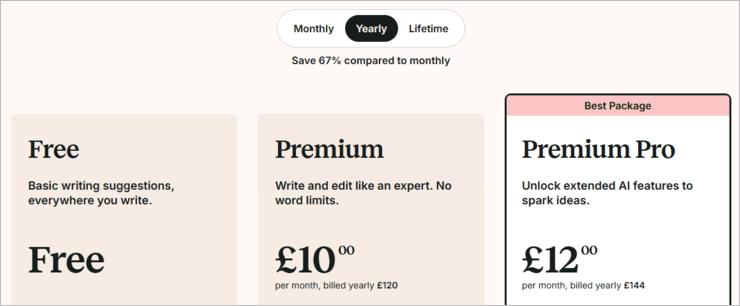
Yearly price:
- $120 Premium
- $144 Premium Pro
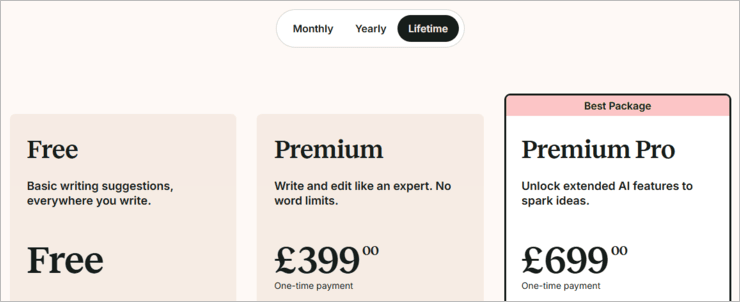
Lifetime price:
- $399 Premium
- $699 Premium Pro
Cons:
- The extension is only for Chrome and not for Safari, Firefox, or iOS.
Verdict: ProWritingAid’s overall performance is really good and the app is satisfying according to the different customer reviews.
#2) Sapling

Sapling is an AI-powered Grammar Checker and Writing Assistant with an enterprise focus. It catches 60% more language quality issues than other spelling and grammar checkers using a machine learning system trained on millions of English sentences.
It works as a browser extension across all your text-based web apps and business platforms like Gmail, Salesforce Lightning, and Zendesk. Autocomplete Everywhere and Snippets improve writing efficiency and productivity.

Features:
- Best in class grammar and spell checking.
- Snippets – Save time by automating common phrases, and expand them with search and shortcut expansions.
- Autocomplete – very similar to Gmail autocomplete, but across all web apps through the browser extensions.
- Custom dictionaries, errors, and models.
- Only grammar checker that offers on-premise/self-hosted deployment or a no-data retention policy.
- Available as a Browser extension for Chrome, Edge, and Firefox.
- Extensions for Outlook, Google Docs, and Google Slides.
- Pop-up available to paste phrases for quick copy-editing.
- Learned from your actions over time.
- Team-based configuration and control.

Pricing:
- Free plan
- Premium: $25 month
Cons:
- No extensions for iOS and Android.
- No extension for Safari.
#3) Originality.ai
Originality.ai is first and foremost and plagiarism detection tool. It is considerably better at detecting duplicate content than Grammarly, especially because of its ability to detect AI-generated content. Another area where Originality.ai easily goes toe-to-toe with Grammarly is in the readability score-generating department.
Originality.ai presents you with the readability score of content when you run it through the tool’s plagiarism scanner. The platform is known for utilizing the most effective 4 readability tests and recommending a range that almost 70% of top results on Google have.
Features:
- Plagiarism Scan
- AI Content detector
- Team Management
- Shareable Reports
- Scan from URL
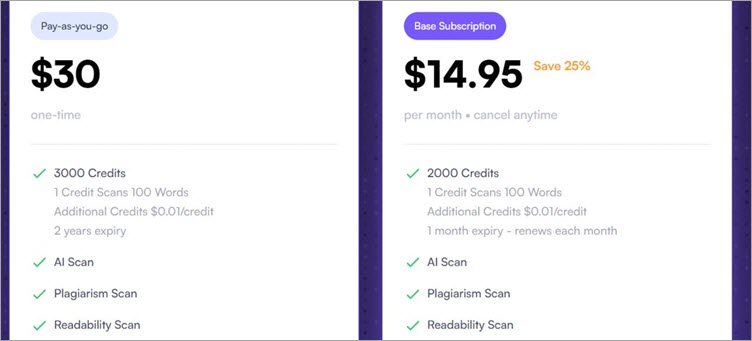
Pricing: Originality.ai is quite flexible when it comes to its pricing structure. You can either opt for the base subscription model, which will cost you $14.95/month or go for the $30 pay-as-you-go model.
Cons:
- Not a full-fledged grammar checker.
Verdict: Easy to use and affordable, Originality.AI is a Grammarly alternative I would recommend for better plagiarism detection and readability assessment.
#4) WordAi

WordAi is yet another tool that uses advanced machine learning to rewrite high-quality content from scratch. With just a single click, you’ll be able to not only rewrite the entire content but also optimize it for clarity, readability, and uniqueness. WordAi is even smart enough to break down wordy content to make it easier to comprehend to readers.
Furthermore, the tool is also quite apt at detecting spelling and grammatical errors. It will correct these errors to make sure you have impeccable content. WordAi also helps you rank higher on search engines. Its AI can detect relevant LSI keywords and add them to your content.
Features:
- Rewrite content from scratch
- In-Built Spell and Grammar checker
- Written content can easily pass AI detection
- Bulk article rewriting
- API Access
Pricing:
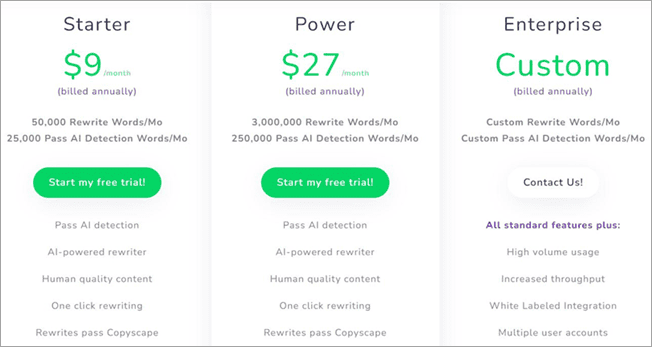
- Starter: $9/month
- Power: $27/month
- Custom enterprise plan
- A 3-day free trial is also available.
Cons:
- No mobile app
Verdict: WordAi’s simplicity and flexible pricing structure make it just as good… if not better than Grammarly. The tool’s AI is advanced enough to produce high-quality content that can pass any form of AI detection.
#5) WhiteSmoke

WhiteSmoke is a tool that is fully integrated and is a state-of-the-art English writing tool for detecting mistakes by improving user experience and knowledge enhancement. Also, it uses Natural Language Processing with AI (Artificial Intelligence) and various algorithms to analyze texts, detect errors, and provide the best possible suggestions.
Features:
- It helps in detecting errors and provides additional information on each error.
- The latest software version has a redesigned layout, tested user experience, and dozens of content updates.
- Uses innovative technology, Natural Language Processing Technology, and Artificial Intelligence.
- Helps you create flawless content with a Grammar checker, Spell-checker, Style checker, Punctuation checker, and Translator.
Pricing:

WhiteSmoke doesn’t offer any Free plan or a free trial.
Its paid plans include:
- Chrome Extension: $4.16 per month
- Essential: $5 per month
- Premium: $6.66 per month
- Business: $11.50 per month
Cons: Poor customer service.
Verdict: Great and cost-efficient software for getting additional information about your mistakes.
Website: https://www.whitesmoke.com/
#6) Ginger

Ginger software is a start-up from Israel that uses Natural Language Processing, improves written communication, develops English speaking skills, and boosts writing productivity.
The software helps you to write faster and better with the help of its grammar checker and punctuation tools that automatically detect and correct grammar mistakes. Moreover, it works on different platforms like Mobile apps, Desktop apps, Web applications, etc.
Features:
- It helps you to write unique text and enrich the text with the help of the Sentence Rephraser tool.
- Emoji for expressing yourself, word prediction for the essence of speed while you are typing, and customizable themes for your keyboard.
- Dictionary for never losing a word, a Translator so you never get halted, and a Personal trainer to improve your English skills.
- Available for all types of browsers like Windows, Chrome, Safari, iOS, Mac, and Android keyboard as well.
- Grammar rules to ensure your writing is accurate and proofreading for checking mistakes with a single tap.
Pricing:

Ginger offers a Free plan for its users along with pricing plans in three different forms:
- Monthly: $20.97 per month
- Annual: $7.49 per month
- Two Years: $6.66 per month
Cons: Like Grammarly, it does not work in Google Docs.
Verdict: Ginger is a useful tool for multi-tasking as it saves a lot of time and improves efficiency.
Website: https://www.gingersoftware.com/
#7) PaperRater

PaperRater is a web-based online grammar & spelling checker especially developed for students to review their papers.
It does robust grammar checking that helps in finding cheeky mistakes and its proofreading system provides suggestions to improve writing. Additionally, the software provides immediate results using Artificial Intelligence and Data Science in just 5-15 seconds.
Features:
- It is also powered by Artificial Intelligence and provides state-of-the-art grammar checking for texts.
- Plagiarism detection with an originality score that shows the amount of text or percentage of your writing is original.
- Vocabulary Builder provides different words, sentences, definitions, and examples while you are writing to improve your English skills.
- Automated scoring system for reflecting a rough idea of what you may score in your writing.
- Grammar & Spelling checker, Feedback & Writing instructions, Real-time & Real easy results with automated proofreader.
Pricing:

PaperRater is a free tool to use and it also offers one Premium plan for users seeking advanced features at $14.95 per month.
Verdict: PaperRater is a great tool for students who want their projects or content to be original.
#8) Reverso

Reverso offers online translation and grammar checking in 14 different languages including French, Spanish, German, Italian, Russian, etc.
Its online translator provides translations for words, phrases, idioms, and short texts in different languages. It also provides accurate translations with the latest technology to help users improve their vocabulary.
Features:
- Instant translations in multiple languages with examples of use in the context.
- Accurate results with a guide to natural pronunciation for sentences.
- No Internet connection is required for accessing the tool.
- Option to view reverse translations and search history.
- Real-time suggestions, Sharing of results, and Flashcards to memorize words.
Pricing:

Reverso offers one Free plan for up to 2500 words.
Its paid plans include:
- Advanced: Pay as you go.
- Customized: Custom pricing.
Verdict: Reverso is a great translation tool and it even translates websites and documents.
#9) SentenceCheckup

SentenceCheckup is an online and free grammar and spelling checker tool that does a deep check to make your documents error-free and improve your writing. The software not only helps in detecting grammatical issues but also checks your sentence structure to make your article clearer and more concise.
The editor also looks for inappropriate words in your text and replaces them with the right words.
Features:
- Completely free and advanced online sentence checker.
- Check the structure of your article to make it more meaningful.
- Grammar checks your sentences to detect errors and mistakes.
- Works with advanced algorithms to make checking and removing errors easier.
Pricing: It is completely free and does not offer any pricing plans.
Cons: The tool works on the advanced algorithm but still it is not a great option for professionals who need advanced features.
Verdict: SentenceCheckup is only suitable when you don’t want to pay an editor to cross-check your work, as this platform will do it for free.
#10) Hemingway App

The Hemingway App lightens up your work by removing the dead weight from your content by displaying wordy sentences in yellow and more egregious ones in red. It helps you to keep your writing simple, with great clarity by highlighting adverbs, passive voices, and complicated sentences.
You can directly start writing in Hemingway editor to proofread your writing and see where you need to focus more.
Features:
- It can be used remotely from anywhere without any Internet connection.
- Format your prose in just a click of a button, and Hemingway will manage it all.
- Publish your content directly to Medium or WordPress with one-click integration.
- Also, export your content to any external editors like Microsoft editor.
- Share your work with your colleagues with Hemingway’s highlights.
Pricing:

Hemingway desktop editor is available for both Windows and Mac OS for a one-time payment of $19.99.
Cons:
- No browser plugin for a paid plan.
- Lack of grammar capability.
Verdict: Great software that tightens your English skills and improves your writing.
#11) LanguageTool

LanguageTool is a proofreading software that checks grammatical, style, and spelling errors in your content. Besides, it is the only tool that checks your writing in more than 20 languages.
The tool comes with thousands of patterns for finding errors in English, French, German, and other languages too. Its Premium plan is designed for students, authors, and freelancers and Enterprise plans are for agencies, companies, etc.
Features:
- Add-on for browsers like Firefox and Chrome.
- Add-on for Google Docs, LibreOffice, and Microsoft Word.
- Multiple language support, Personal dictionary, and Autocorrect.
- Suggested correction, Keyboard shortcuts, Rule-based, and privacy.
- An open-source online proofreading platform for detecting errors and issues.
Pricing:

LanguageTool offers one free plan for 20,000 characters per check.
Its paid plans include:
- Premium: 40,000 characters per check ($4.92 per month).
- Enterprise: 40,000+ characters per check ($39 per month).
Cons:
- No plagiarism detecting option.
- All devices are not supported.
Verdict: LanguageTool is a free and open-source tool that allows you to check your content in multiple languages. Its Paid plans are also good for different users.
#12) Slick Write

[image source]
It doesn’t matter whether you are a Blogger, Novelist, SEO professional, Agency, Teacher, or Student, Slick Write makes it easy to check your writing for grammar errors, mistakes, style errors, etc.
It helps you check your grammatical errors in no time and the best part is that it is a completely free alternative to Grammarly. No software download or installation is required.
Features:
- Lightning-fast grammar check to save as much time as possible.
- Customizable feedback to suit any style of your choice.
- Privacy and security of your documents with encryption of data.
- Make your presentations & reports easily and add impact to them.
- Engage your audience with high-quality content and improve your grades.
Pricing: Slick Write is a free online proofreading software and comes with no pricing plans.
Cons:
- Fonts are of small size only.
- The interface is not very intuitive.
Verdict: The software is web-based and can be used by anyone. Besides, the writer can have control of what the site can do.
#13) Scalenut

Scalenut is a solution I would recommend to businesses and marketing agencies who wish to go beyond Grammarly’s content verification capabilities. With Scalenut, you get an AI-powered content planning and SEO optimization tool. Scalenut can generate keyword clusters and compelling content strategies with just a single click.
It can also arm users with stats and semantics that help produce content that surpasses the one produced by competitors. The solution makes sure that the content generated is ready-to-rank, SEO optimized, plagiarism-free, and factually correct.
Features:
- AI-based content planning and research
- SEO optimization
- Plagiarism checker
- SERP Analysis
- Use up to 40+ AI templates
Price: Scalenut offers flexible subscription plans, which are as follows:
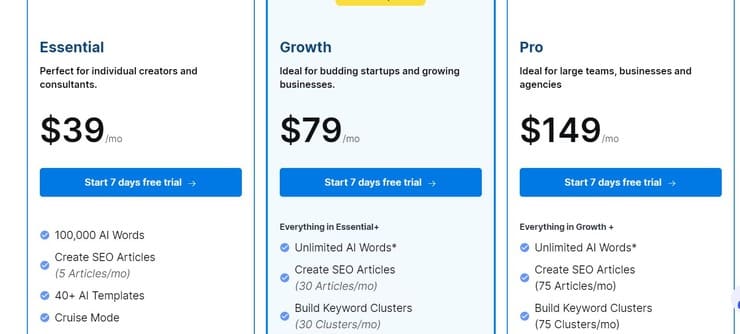
- Essential: $39/month
- Growth: $79/month
- Pro: $149/month
Cons:
- It may overwhelm users who are looking for simple grammar-checking capabilities only.
Verdict: Scalenut is not your typical grammar checker. It is an AI-powered solution more suitable for content planning, research, and SEO optimization. As such, I would recommend this tool to marketing teams, businesses, and agencies that focus on digital marketing.
#14) Wordtune

An AI-powered writing companion, Wordtune helps you express yourself more clearly, compellingly, and authentically. If you’re writing your emails, creating documents for your clients, or exchanging instant messages with your colleagues, Wordtune will help you express yourself more effectively.
Features:
- Rewrite – Find new ways to express yourself. If you need to rephrase your text, Rewrite suggests alternatives.
- Tone & Length – You can choose the tone and length of your rewrite suggestions. Do you want to be more casual? Shorter? It’s fine! Rewrite helps you use the most effective phrasing.
- Translate and Rewrite simultaneously – Write in a foreign language, and when you select Rewrite, you will receive English rephrasing suggestions. Non-native English speakers will appreciate the feature.
- Wordtune Works Where You Do – Works on any platform! The list includes Gmail, Google Docs, Outlook (web version), Facebook, Whatsapp (web version), and more! Without the extension, you can access Wordtune Editor, a central place that works across browsers.
Pricing:
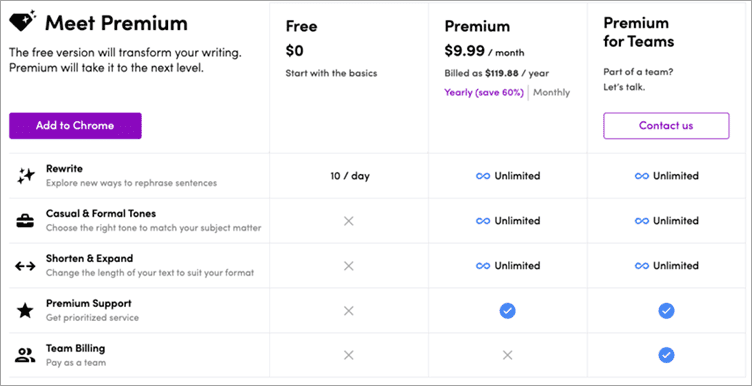
Wordtune offers a free plan along with two different paid plans:
- Wordtune Free: Free plan
- Wordtune Premium: $9.99 per month.
- Wordtune Premium for Teams: Contact sales.
Cons:
- The extension is only for Chrome and not for Firefox, or iOS.
- No extension for Safari.
Verdict: Wordtune’s overall performance is really good and the app is satisfying according to the different customer reviews.
#15) Linguix

Linguix is one of the best AI-based spelling grammar checkers out there. It catches grammatical errors with top-notch accuracy and allows you to rectify the errors with just a single click. You don’t have to pay a dime to use the tool’s spell-check or grammar-checking capabilities. With it premium plan, you’ll also be able to perform content re-writes using ChatGPT-like models.
Features:
- Spell Check
- Extension for Chrome, Firefox, and Edge
- Content Quality score
- Full-sentence re-writes
- Team Style Guide
- Multi-lingual support
- AI-powered paraphrasing
Pricing:
- Free plan available
- Pro: $30/month
- Lifetime plan: $108
- Custom business plan available
Cons:
- The free plan can only perform spell and grammar checks
Verdict: Simple to use and exceptionally intelligent, Linguix is an affordable AI-based writing tool that all types of writers can use to for a better command over the English language.
Website: https://linguix.com/grammar-check
#16) Course Hero
Best for Students and Writers.
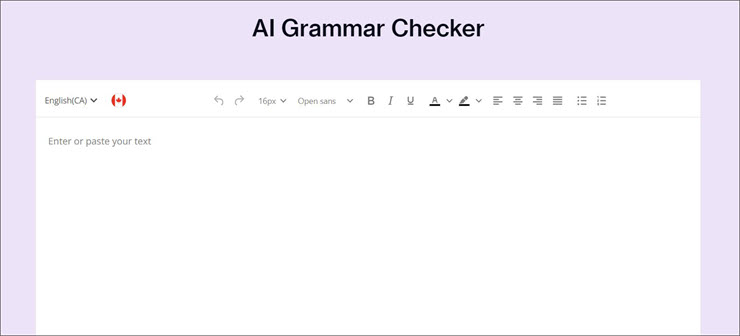
Course Hero does everything you’d expect Grammarly to do. However, it has the latter beat in the AI department. Course Hero’s AI is intelligent enough to immediately proofread the content you read it. It will correct any punctuation errors, fix the syntax, detect spelling mistakes, and even suggest new words to enhance your content’s quality.
Course Hero also lets you switch between 4 different variants of English to ensure your content is more consistent in tone and quality. Course Hero’s AI can also help you paraphrase content or even produce an outline of it without any effort.
Features:
- Correct spelling mistakes and suggest alternatives.
- Fix any grammatical errors found automatically.
- Leverage AI to paraphrase content or create an outline.
- Choose from UK, US, Canadian, and Australian English variants.
Price: free to use. You can opt for the $9.95/month subscription (billed annually) to use the platform at its maximum potential.
Cons:
- The annual subscription might not appeal to students.
Verdict: As a spell checker or proofreader, we believe Course Hero is a great alternative to Grammarly, largely because of its AI. It is free to use and there are no limits to the words you can check.
Website: https://www.coursehero.com/
Conclusion
Everybody needs a Grammar checker, Proofreader, or Plagiarism checker tool to write professional and error-free content. Such tools also help writers to increase their efficiency, save time, and be more productive. These tools also save the money required to hire an editor for proofreading.
Except for WhiteSmoke, all the other tools offer a free plan for grammar checking and correcting. You can use any of the tools for the free plan as every plan is limited. However, tools like Slick Write and SentenceCheckup are completely free with some extra features than the other tool’s free plan.
For users who require advanced features, ProWritingAid, WhiteSmoke, and Ginger are the best alternatives to Grammarly. For those, who want to perform translations and error checking in multiple languages the LanguageTool & Reverso are the best options.
Also, read =>> Top PDF to Word Converters
Was this helpful?
Recommended Reading
-

Most Frequently used Document Management System: With the ongoing process of Digitization, people wish to reduce their paper-based work and expect to have access to their important documents from anywhere and at any time. Document Management Systems are the best solution to make this task a much easier one. PDF…
-

Overview of the best web accessibility testing tools and techniques in the market: All that You need to know about Web Accessibility Testing was explained in detail in our previous tutorial. Accessibility is the term that refers to the accessibility of any software system to people without or with physical…
-

List of The Most Popular Content Marketing Software With Features and Comparison. Select The Best Content Marketing Tool For Better Customer Retention: Content Marketing is a tactical marketing approach to reach out and retain the audience. The content distributed is relevant thus it attracts consumers by providing authentic information. Business…
-
Good communication skill is a must for software testers. You might have seen this line in every job requirements especially openings in QA and testing field. As testers require communicating with different project team members including clients, communication skill plays important role. Read on more tips to improve your communication…